

By Dawid L., March 01, 2026 · 12 min read
Codex vs Cursor - A Practical Comparison
Most teams don’t choose the wrong AI tool. They choose the wrong workflow for the problem they’re solving.
Whether we like it or not, AI coding tools have become a part of everyday development. A lot of teams assume that AI in development will automatically speed things up and reduce costs - but in reality, that’s not always the case. Different tools work in different ways, and choosing the right one often depends on your workflow, experience level, and what kind of projects you’re building. In this article, I’ll compare two of the most widely used solutions: Cursor AI and OpenAI Codex. The goal is to break down Codex vs Cursor in practical terms - how they actually work, when they’re useful, and when they might slow you down instead of improving developer productivity.
What Is Codex?
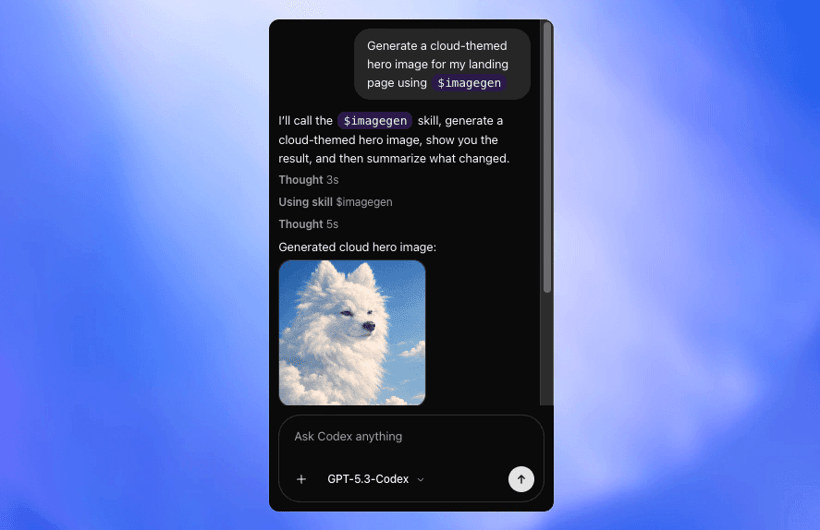
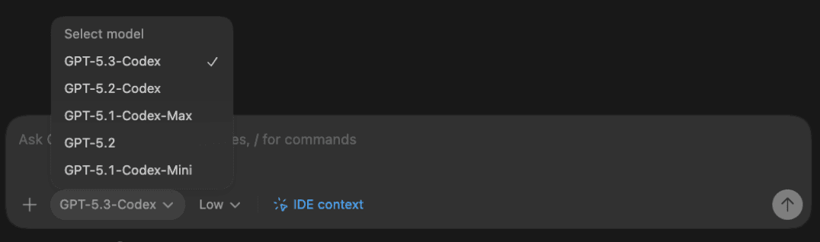
Codex is OpenAI’s answer for coding tools like Windsurf and Cursor AI. It’s an AI programming assistant that can be installed either as an IDE extension or a CLI tool. In the extension itself, we can choose from various OpenAI models, like the latest GPT 5.3 Codex. It can also be used with different reasoning levels - low, medium, high, and extra high. I usually use medium or high, depending on the complexity of the task at hand.
source: codex
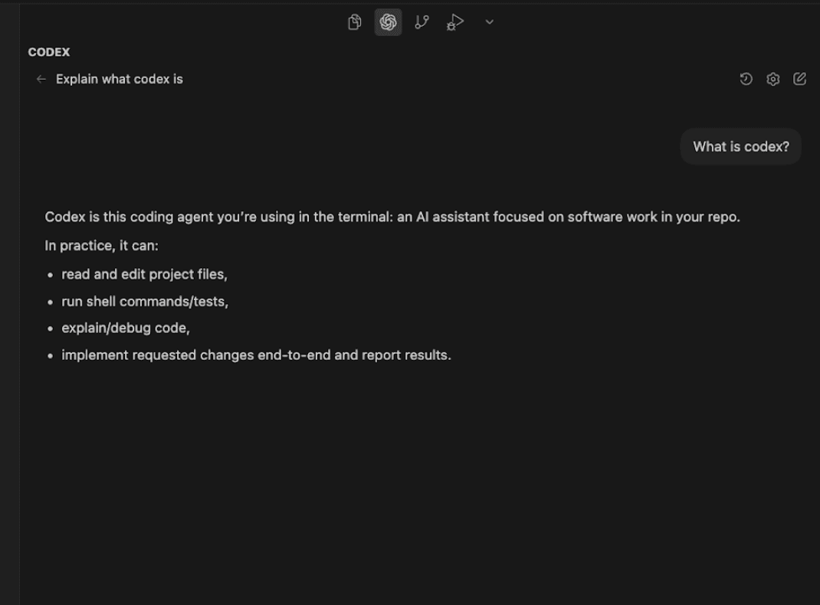
Codex works like an AI agent. It analyzes the project context, reads through the codebase, understands dependencies, and applies consistent multi-file changes when needed. Most of the time, it can finish tasks on its own with minimal supervision. The philosophy behind Codex is taking more time, but ensuring the task is implemented correctly. It often follows a plan → implement → verify workflow, which makes it feel more like a task-solving assistant than a typical IDE autocomplete tool. Since the GPT 5.3 Codex model, it got much better, even with shorter prompts. Thanks to this, I don’t have to waste much time on structuring prompts and can move on with tasks faster than before. Here is a showcase how it looks in Visual Studio Code.

It can
- Understand the entire codebase - read project files, analyze structure, dependencies and symbol usage
- Modify code across multiple files - apply coordinated changes and perform refactors
- Answer technical questions about the project - explain logic, architecture and implementation details
- Plan and implement tasks - break down features into steps and generate code step by step
- Run and validate changes - execute commands in a sandboxed environment (e.g. npm run build), help debug errors and suggest fixes
It is useful for
- End-to-end task execution (features, bug fixes, modules implementations)
- Multi-file code changes with consistent updates across the project
- Codebase analysis and navigation (understanding dependencies and structure)
- Iterative debugging and fixing (plan → implement → verify workflow)
- Working with minimal prompt engineering, even on complex tasks
What Is Cursor AI?
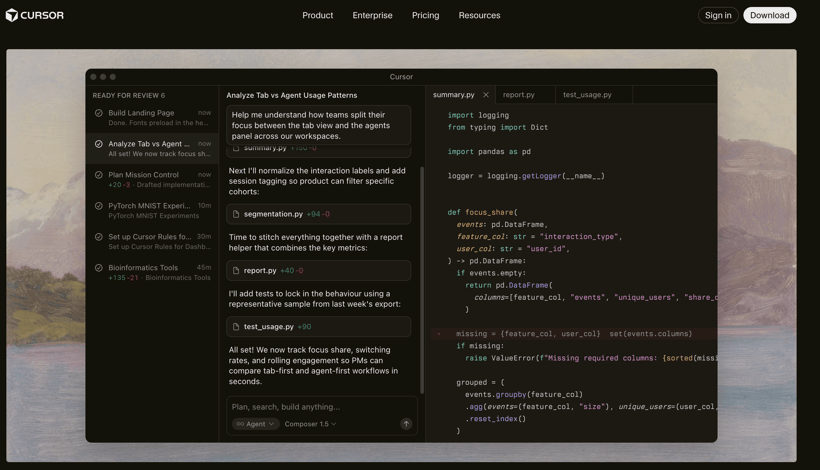
Cursor AI is an AI-powered code editor built around fast, context-aware development. In practice, most developers describe it as an AI-enhanced VS Code that feels tightly integrated into everyday coding rather than a separate agent that takes over tasks.
The main strength of Cursor is speed and responsiveness. It works best in short feedback cycles: you describe a change, review the diff immediately, tweak it, and continue. This makes it especially effective for iterative development, refactoring, and routine improvements where you want to stay in control.
source: cursor.com
Cursor can understand project structure and relationships between files, and it’s capable of applying coordinated changes across multiple files. However, how well it performs depends heavily on the selected model. With stronger reasoning models, it can handle larger structural changes and more complex logic. With lighter models, it behaves more like an advanced contextual autocomplete and refactoring assistant.
Unlike fully autonomous agents, Cursor is usually developer-driven. It doesn’t typically run a long plan–execute–verify cycles on its own. Instead, it augments your editing process in real time, helping you move faster without fully stepping out of the coding flow.
It can:
- Understand the project context - read files, analyze structure, dependencies, and relationships between modules
- Generate full prototypes - cursor excels in quick, mass code generation
- Provide contextual inline completions - shows code suggestions as you type, from multi-file context
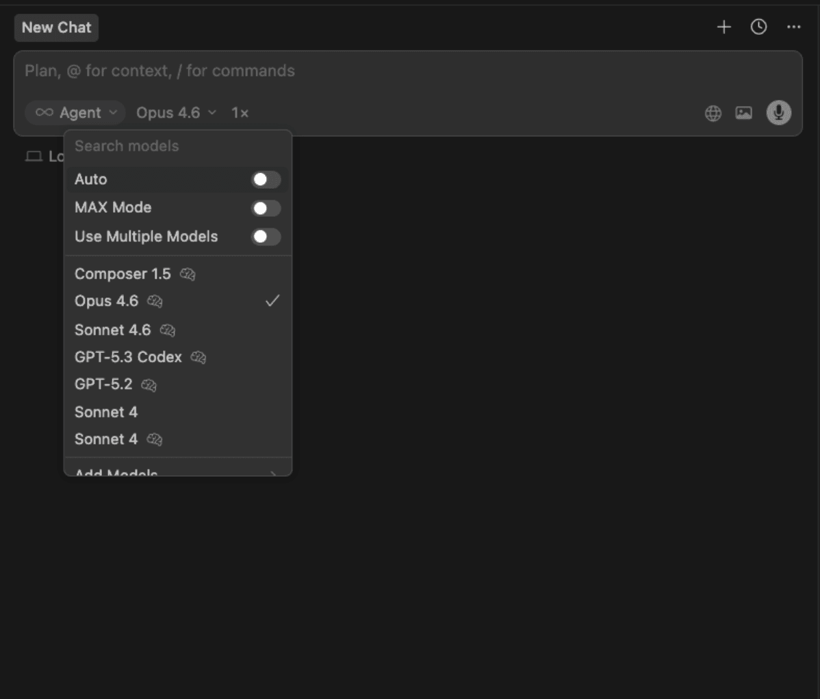
- Debug both UI and terminal - has a built-in web browser and terminal, which can be read and interpreted by AI
- Run commands autonomously - you can whitelist or blacklist commands to be run by AI
It is useful for:
- Rapid feature development and day-to-day coding
- Multi-file refactors with immediate feedback
- Codebase exploration and understanding unfamiliar projects
- Incremental improvements and structural cleanup
Here is a showcase how Cursor AI looks like:

Key Differences
A. How They Work
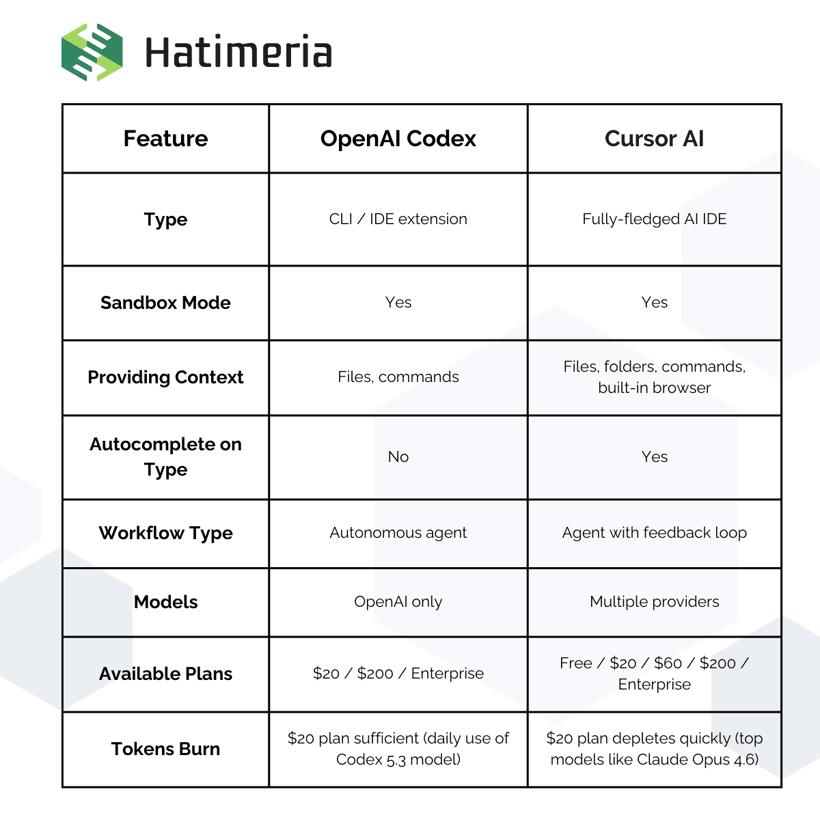
Codex works more like an autonomous AI agent, that takes more time to complete, but tries to understand the task fully, which usually provides very accurate results. On the other hand, Cursor is faster with its responses, but for more complex tasks it might perform worse, unless we use the most expensive models.
B. Working With Context
Codex focuses on analyzing the whole project before making changes, often reading through a lot of files and task details. Cursor is faster in reading context and making changes, but you have to be more direct about context and expected outcome.
C. Workflow
Codex is focused on completing the task alone, with some guidance and questions from time to time. It gets most of the tasks right on the first try, and understands errors very well. However, it cannot directly read your terminal, so debugging is not that optimal. Cursor has more capabilities, like built-in browser and terminal, which makes debugging a lot easier.
D. Speed vs Fixing Time
Cursor is usually faster in response time and works great for quick iterations and high-volume tasks, but it may require more manual corrections on more complex problems. Codex typically takes longer to generate results and is less optimized for mass file generation, but it often delivers more complete and reliable solutions on complex tasks, reducing the time spent fixing mistakes.
When to Use Codex
Codex excels in context-heavy tasks, which require a lot of manual searching and bringing a lot of logic together. It also works well for initial code reviews, as it catches obvious holes in code logic and missed code conventions. However, I would not recommend codex for mass ui generation, like creating a prototype to present to a client. The extension gets pretty laggy when it writes thousands of lines of code. It’s better to stick to one end-to-end task at a time.
Here’s a good example of how codex can be used to speed up working on a software module. Magento is a very popular and highly extensible ecommerce platform, but it’s known to give some hardships when it comes to creating more customized extensions, since many things might break on the way.
We had to create a module for the Magento product page gallery. In this project, the concept of packaged products was introduced. Each packaged product has 2 or more children's products, which are sent in a single parcel. The issue is that we have to sync the packaged product gallery with the select option from children products.
This work was done as part of the GraduationSource project. GraduationSource is one of the leading US online retailers specializing in graduation products, serving over 30,000 schools worldwide.

Product page gallery that has to switch parent images based on child products options. Using Codex, I added two new fields to the image editing - one for the child option and the second for its value. The map of image - option - value is saved in the database, and loaded into the storefront.


Now when the selector for child product options is used in the packaged product page, it automatically scrolls to the corresponding image.
In this case, we were able to cut down the 8h estimated task to 2h of testing, code revision and small refinements. Codex works really well with Magento modules, both in understanding existing ones, as well as creating new ones. However, professionals have to review the code and make sure that everything is working according to requirements. AI still makes a lot of mistakes, which might not be obvious to inexperienced developers.
When to Use Cursor
Cursor is also well equipped for complex tasks, especially with the latest Anthropic and OpenAI models. However, it truly excels in building fully functional proof of concepts and MVPs. It won’t struggle with generating several dozen files, and has exceptional debugging capabilities, which speeds up the process even more.
A good example for Cursor usage is creating an application with a fully fledged UI, which can be then used multiple times, instead of a one-off script for a single task.
We were tasked with migrating product and customer data from polish platform Shoper to Shopify. The old store had several hundred products and over 100k customers, with new products and customers coming during the new website development process. That’s why we decided to create a utility tool, which enabled us to quickly migrate data on demand.
Here is our utility application dashboard:

We added multiple types of migration, as well as an option to send invite emails for migrated customers, which boosted conversion rate to the new website.

Here’s how the migrator works using sample data set:
Business Perspective - What This Means for Clients
A. Cost
The cost is highly reduced, as much of the developer’s time is saved. Teams can focus more on business logic rather than coding the solutions. Most of the time will be spent on testing, code revisions and eventual debugging. Onboarding developers to the new projects will also be faster, as AI can sum up the codebase and point out where the business logic is.
B. Risk
Most of the risks come from trusting the AI too much and building up the technological debt. It’s easy to accept every working AI-generated code, but we have to remember that AI is still not perfect. Developers should check the generated code and keep its quality, so that it won’t become an issue in the future.
C. What Clients Should Ask
Instead of asking: “Are you using AI?” They should ask:
- Where do you use AI?
- Who reviews AI-generated code?
- How do you control quality?
Common Mistakes Teams Make
When using AI, it’s easy to get comfortable and let it do all the work for you. However, there are some common mistakes made by developers, who use these tools on a daily basis.
Treating AI Output as Production-Ready
One of the most common mistakes when using tools like Cursor AI or OpenAI Codex is assuming that the generated output is ready to deploy to production. The code may look clean and well-structured, but it can still contain subtle bugs, missing edge cases, or security issues. The key is to always perform a code review on the generated code, with special care for crucial business logic.
Vague or Context-Poor Prompts
Another frequent issue is providing instructions without sufficient context. When prompts lack architectural constraints, framework details, or business rules, AI code generation systems fill in the gaps with assumptions. Those assumptions often do not align with the actual project, which leads to unnecessary refactoring and lost time.
Not planning out the Implementation
AI is improving every day and taking on more of our workload, but it doesn’t replace the fundamentals of proper programming. When you’re dealing with complex tasks, the most reliable approach is to break the work into clear steps, use a chat model like ChatGPT to help turn each step into a precise prompt, and then execute the implementation step by step by feeding those prompts into your coding AI.
Not Testing the generated code thoroughly
A common mistake is assuming that generated code works correctly just because it runs without immediate errors. Core functionality and business logic should always be properly tested, whether the code was written manually or produced by AI. Critical paths and edge cases need verification, either through automated tests or careful manual testing. Skipping this step is one of the easiest ways to introduce subtle bugs into production.
Ignoring Security and Edge Cases
Code automation tools often skip proper validation, error handling, and defensive programming. Without careful review, these gaps can reach production and create avoidable risks. Since models are trained on code of varying quality, they may also reproduce insecure or outdated patterns. Generated code should never be trusted by default, especially in security-sensitive areas.
Summary
Cursor and Codex are both powerful AI coding tools, but they focus on different workflows. Cursor is a fast AI IDE optimized for real-time development, quick refactoring, and high-volume tasks like UI generation. Codex is a more autonomous agent-style tool that takes longer to respond, but performs better on complex tasks, deeper reasoning, and end-to-end implementation with fewer mistakes.
Personal Perspective - Which I Would Choose and why
It really depends on the task at hand. If I need to quickly generate a prototype or MVP, I usually go with Cursor, since it excels at fast, high-volume code generation and can handle the debugging by itself. However, when I’m dealing with complex logic and need more autonomy from the agent, I prefer Codex. It takes more time, but it tends to deliver more reliable results, and I’m just testing and reviewing the code.
Business Summary
Codex and Cursor are two powerful sets of AI tools that saves a lot of developers’ time. While Codex excels in extending platforms with highly complex modules, cursor can generate prototypes in mere minutes, with little to no help from the developer. It all comes down to using these tools properly. They can dramatically speed up the development process a lot, but without proper oversight, they have a high chance of making the project a total nightmare to debug and maintain.
Would you like to innovate your ecommerce project with Hatimeria?

Junior Fullstack Developer, comfortable both with writing code and playing guitar. Studying Computer Science at Cracow University of Technology for the past three years, with a strong focus on teamwork. Passionate about music - from soft tunes to heavy rock - and often spotted at live concerts. Loves fantasy worlds in books and games, especially The Witcher, Cyberpunk, and Metro. Favorite mood booster? Linkin Park, "Numb".